Python Snake Simulator
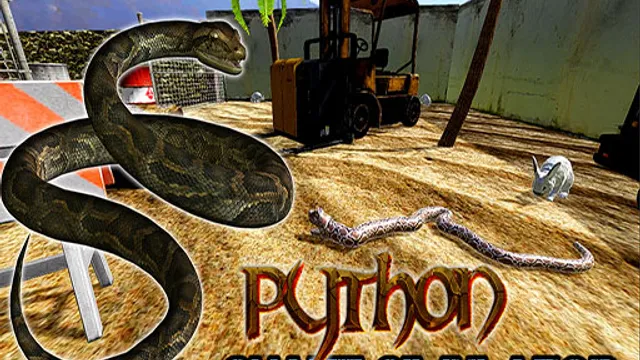
Python Snake Simulator reimagines the classic snake concept as a free-roaming 3D adventure instead of a confined grid. The standout feature is the full camera control, which turns a simple arcade reflex test into a spatial exploration challenge. You spend as much time positioning the view with the mouse as you do steering the serpent.
The core loop involves moving the snake to consume targets and grow longer without colliding with the environment. You steer the head using WASD or Arrow Keys while the mouse moves the camera to see around corners or obstacles. Pressing Space or LMB raises the head, which is useful for looking over barriers or adjusting your approach angle. Every moment requires a decision on whether to rush for food or slow down to navigate tight spaces safely.
This game works well for casual players looking for a quick browser distraction, from kids learning spatial awareness to adults unwinding during a break. The 3D perspective adds a layer of depth that keeps the basic formula interesting for a short session. Tip: Use the E or Shift key to toggle Head Up frequently in the first minute, as maintaining a high vantage point prevents accidental collisions with low walls.
How to Play
WASD Arrow Keys - move Mouse move - camera Space LMB - Head Up E Shift - Toggle Head Up R - Restart P - Pause Menu
FAQ
- How do I control the camera in Python Snake Simulator?
- Move the mouse to look around.
- What does the Head Up mechanic do?
- Pressing Space, LMB, or toggling with E/Shift raises the snake's head to see over obstacles.
- How do I restart after crashing?
- Press R to instantly restart the game.
Similar Games

Boomer Pop
Army Truck Driving Game

GARTEN OF BANBAN

Garten of Banban 2
Us Army Vehicle Transport Truck
Barry On The Space

Robot Car Transform 2

Lost World
More Adventure Games

Snow Plowing Simulator
Wizard Adventure

Majestic Dash
zoo Animal Transport Game
Chick Chase
Potrick Garage Storage

Safety Pin Couple

Value Multiplier
Crazy Extreme Truck Parking Simulation 3d
Extreme Crazy Car Stunt Race Mega Ramps
City Construction Games 3D
Box Challenge